 last,
last,  next,
next,  previous,
  first change
 all,
all,  none,
none,  invert selection on the left,
  all,
all,  none,
none,  invert selection on the right side
 left selected items to the right side,
  right selected items to the left side
 selected items on the right side,
  selected items on the right side
 Export to Xlsx or Json
This tab allows to compare definition of particular table:
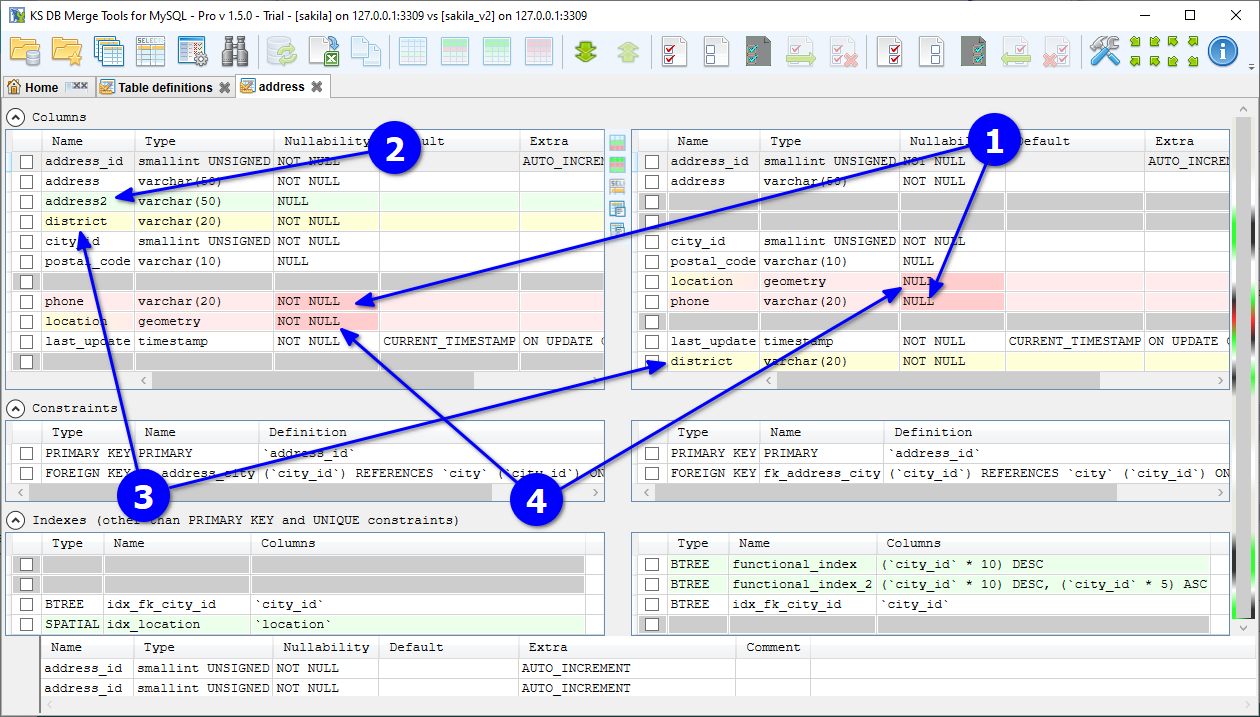
Tab is divided into 4 major collapsible sections (Columns, Constraints, Indexes and Triggers) and bottom panel for selected item details. Here is explanation of changes highlight annotation on the above screenshot:
Vertical toolbar between two panels contains additional tab-specific actions:
 Open data diff for the current table
 Open data diff for the current table filtered only to new and changed records
 opens query result diff with select top 1000 records statement for this table
 'Open table definition as text' opens text diff tab with table script generated by application
 'Open SHOW CREATE TABLE result' opens text diff tab with table script provided by database server with SHOW CREATE TABLE command
Please note that merge/delete action may fail because of limitations caused by other objects such as foreign keys, existing data and so on. Please check the merge execution result for details.
Column Extra for columns can have one of the following items: AUTO_INCREMENT, ON UPDATE rule, VIRTUAL GENERATED, STORED GENERATED or INVISIBLE. The last one (INVISIBLE) can be combined with others. If the column is AUTO_INCREMENT and selected to be merged, then the generated merge statement has PRIMARY KEY included even if it is not selected in Constraints, because auto-increment can not be specified without a key. VIRTUAL GENERATED and STORED GENERATED correspond to generated columns, and in this case column Generated As also includes column generation expression.
The Triggers section has 3 columns: Time (BEFORE or AFTER), Event and Name. Event is INSERT, UPDATE or DELETE. In MariaDB 12.0 and newer one trigger can have several events, for example INSERT OR UPDATE, and an UPDATE event can have a column list, for example UPDATE OF col1, col2.
A table can have several triggers with the same time and event. The database server runs them one after another, in a fixed order. This order is important, so the section shows triggers in groups, and in the order of execution inside each group. The section header tells how triggers are grouped:
If a trigger has another position in its group on the other side, it is highlighted in yellow, the same way as a column with changed column order. When you merge a trigger, the application adds FOLLOWS or PRECEDES to the script, so the trigger gets the same position in the target table as in the source table. There is no ALTER TRIGGER statement, so a changed trigger is dropped and created again.
A trigger with several events can be merged only to MariaDB 12.0 or newer. A trigger with UPDATE OF columns can be merged only to MariaDB 12.2 or newer.


