This dialog is opened when you merge objects in the Object list or Table structure diff tabs. It shows information about the merge action and potential warnings depending on the object type and merge conditions.
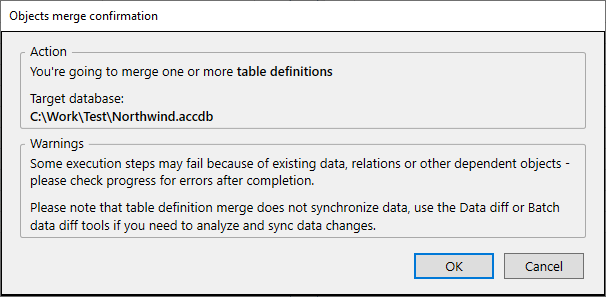
The dialog contains the following sections.
This section displays the type of object being merged and the target database:
You're going to merge one or more {Object type}.
Target database:
{Target database name}
This section is shown only when there are potential issues with the merge operation. The warnings depend on the object type and the changes being applied.
Warning about data loss, performance or data integrity issues (shown when any of the specific data issue warnings apply):
The following actions may produce DATA LOSS, performance or data integrity issues:
- replacing a regular table with a linked one (old table dropped with dependent relations)
- column deletion
- changing data type or size
- index deletion
Warning about possible execution failures due to existing data or dependencies:
Some execution steps may fail because of existing data, relations or other dependent objects - please check progress for errors after completion.
Warning about relations not being processed when merging table definitions from Object list:
Some of selected tables participate in relations. Relations are not going to be processed by the current merge action. Please merge relations from Relations object list or for each table separately.
Warning that table definition merge does not synchronize data:
Please note that table definition merge does not synchronize data, use the Data diff or Batch data diff tools if you need to analyze and sync data changes.
This section is shown only when merging tables in the Object list or Table structure diff tabs and the merge includes new Required (NOT NULL) fields. If the target table already contains data, this operation may fail or violate the Required constraint.
You are about to merge table(s) that include new Required fields(s). If the target table already contains data, this operation may fail, or the existing data may violate the Required constraint for new field(s). To prevent this, you can disable the Required property. Then you can merge data and run table definition merge again to resolve any remaining Required property differences.
○ Keep Required enabled ○ Disable Required
After reviewing the warnings and selecting options, click OK to proceed with the merge or Cancel to abort the operation.


